
You’ve tried unsubscribing. You’ve set up filters. You’ve clicked “mark as spam” until your thumb is sore.
And yet every morning your inbox looks the same, a pile of unwanted emails from companies you’ve never heard of, mixed in with things you actually need.
Here’s the problem: everything you’ve been told about stopping spam is reactive. You’re cleaning up a mess that gets rebuilt overnight. The real fix happens before the first email ever arrives.
Why Unsubscribing Doesn’t Work
Hitting unsubscribe feels productive. It’s direct action. But for spam (meaning email from senders you never actually signed up with) it usually makes things worse.
When you click unsubscribe on a suspicious email, you’re doing one thing:
confirming that your address is real, active, and monitored by a human.
That’s valuable information. Spammers often sell email addresses marked as validated to others, which can result in more spam, not less. Many email lists circulate as cheap bulk data, and a huge portion of addresses in them are dead. When you engage (even to opt out) you signal that you’re not.
There’s a meaningful distinction worth making here. If you click unsubscribe on a newsletter from a legitimate company, such as a store you bought something from, a brand you actually know, that’s usually fine. Reputable companies follow email laws and will remove you.
The problem is the other category: email from senders you don’t recognize, promoting things you never asked about. These are completely different, and unsubscribing can invite even more junk mail instead of stopping it.
Spam filters help, but they’re also reactive. They learn after the fact. They miss things. They occasionally eat legitimate email. And they do nothing to prevent your address from being handed around in the first place.
The Real Problem Is Your Email Address Itself
Think about how many places have your email address right now. Your bank, your doctor, every e-commerce site you’ve ever ordered from, every app you signed up for in 2017 and forgot about, every form you filled out to get a discount or download something free.
Your email address is a permanent identifier. It follows you across services, connects your accounts, and travels (often without your knowledge) through data broker networks and marketing lists. Every time you hand it to a new service, you’re trusting them not to sell it, leak it, or misuse it. Some of them will. And once it’s out, you can’t take it back.
This is the thing spam filters don’t address. The email is already headed to your inbox. The address is already out there. The damage is, unfortunately, done.
The Strategy That Actually Works
Instead of managing spam after it arrives, you stop it at the source by never giving out your real email address in the first place.
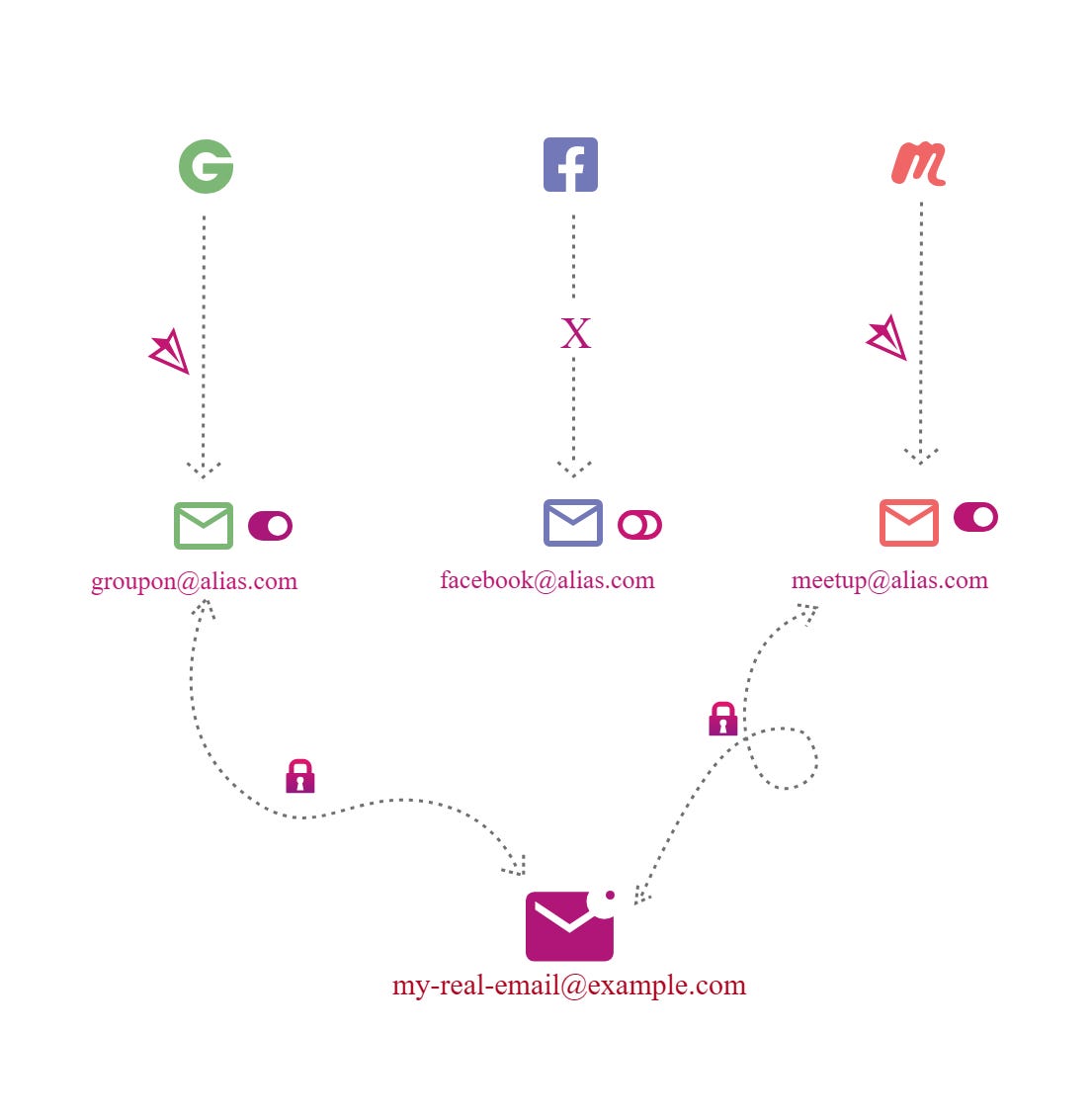
Email aliasing services let you create unique forwarding addresses, ideally one per website or service, that route to your real inbox behind the scenes. To the outside world, you’re “shop123@simplelogin.com“ or “newsletter-xyz@addy.io.” To you, the email still shows up where it always does. But now you have something you didn’t have before: control.
If that alias starts getting spam, you have a pretty good idea of who’s responsible, and you can disable it in seconds. The spam stops. Your real address is never touched. You don’t have to migrate anything, change accounts, or start fresh with a new inbox.
This is how the top 1% of privacy enthusiasts manage what’s already happening. Your address is being shared and sold without your explicit awareness. Aliases give you visibility into that, and the ability to do something about it.
Which Tools to Use
A few options, depending on your situation:
SimpleLogin is the one I’d recommend to most people. It’s open source, works on any device, and has a free plan that covers up to ~10 aliases. That’s enough to test the approach before committing. The paid plan is roughly $4 per month and includes Proton Pass Plus. It works with Gmail, Outlook, or whatever inbox you’re already using. The browser extension makes creating aliases fast enough that you’ll actually do it.
Addy.io is the alternative worth knowing about. The free plan offers unlimited aliases, which SimpleLogin doesn’t match at that tier, though Addy restricts replies on free accounts. If you’re comfortable spending a few dollars a year on a Lite plan, it’s a solid option. Both SimpleLogin and Addy are open source and independently auditable, which matters if you’re trusting them with your email flow.
Apple’s Hide My Email works if you’re in the Apple ecosystem. It’s built into iCloud+ and integrates cleanly with Safari and iOS, so the friction is low. The downside is it only works on Apple devices, which limits your flexibility if you ever switch or use a work computer.
If you’re already a Proton Mail user, SimpleLogin is the natural fit because they’re owned by the same company and integrate directly.
How to Start
You don’t need to go back and change every account you’ve ever created. That’s not practical and not the point.
Start with new signups. From today forward, whenever a site asks for your email, generate an alias instead. It takes about ten seconds with a browser extension installed. Over time, your alias layer grows while your real address stays contained to the places you actually trust, like your bank, your doctor, close colleagues, people you know.
When an alias starts getting spam, you’ll know who let it out. Disable it, create a new one for that service if you still need it, and move on. No inbox crisis. No unsubscribing from an ever-regenerating list.
It’s a different mental model for email, one where you’re making deliberate choices about who gets access to you, rather than just hoping the filters catch everything.
Here’s a video showing how to use email aliases on CamelCamelCamel.com when creating price alerts on Amazon.com.
One More Thing
If you want to go deeper on this, including a full system for managing your inbox, not just an alias here and there, the Inbox Firewall guide included in our privacy bundle covers the complete setup. It walks through the alias strategy in detail, how to handle existing accounts, and how to structure your email so that different parts of your life stay separated from each other. That guide is the place to go if you want a system, not just a fix for the next wave of spam.

Looking for help with a privacy issue or privacy concern? Chances are we’ve covered it already or will soon. Follow us on X and LinkedIn for updates on this topic and other internet privacy related topics.
Disclaimer: None of the above is to be deemed legal advice of any kind. These are *opinions* written by a privacy and tech attorney with years of working for, with and against Big Tech and Big Data. And this post is for informational purposes only and is not intended for use in furtherance of any unlawful activity. This post may also contain affiliate links, which means that at no additional cost to you, we earn a commission if you click through and make a purchase.
Privacy freedom is more affordable than you think. We tackle the top Big Tech digital services and price out privacy friendly competitors here. The results may surprise you.
Check out our new, free username generator to help you create unique usernames for different accounts. Reusing usernames is convenient, but terrible for your privacy. This tool makes it easy to create unique usernames on the fly.