


Every time you visit LinkedIn in Google Chrome, a hidden script silently inventories your installed browser extensions. It probes for over 6,000 of them.
The results are quietly sent back to LinkedIn’s servers for processing and data mining. None of this is in LinkedIn’s privacy policy.
This is BrowserGate, a detailed investigation published last week by Fairlinked e.V., a European association of commercial LinkedIn users. BleepingComputer independently confirmed the scanning behavior through its own testing.
LinkedIn calls it a security measure. The rest of us call it covert surveillance of a billion users’ browsing behavior at industrial scale. BrowserGate is a bad look for Microsoft owned LinkedIn and reinforces their poor privacy tactics.
But there’s a larger issue here beyond LinkedIn. And that is Google Chrome’s role, which makes this whole scheme possible (and all the similar ones out there you don’t know about yet).
What LinkedIn Can Actually Learn From Your Extensions
A list of browser extensions sounds like dry technical data. It isn’t.
Some of the extensions on LinkedIn’s scan list may indicate religious beliefs, political views, health conditions, or whether a user is actively seeking employment.
The investigation found 509 job search tools on the list, including extensions for Indeed, Glassdoor, and Monster. If you’re quietly browsing jobs while your current employer can still see your profile, LinkedIn may already know.
The list also includes extensions that identify practicing Muslims, tools built for neurodivergent users, and partisan news filters that reveal political leanings. Under EU law, this is special-category data. Collecting it without explicit consent is prohibited, not just discouraged.
Perhaps most interesting, LinkedIn scans for over 200 products that directly compete with its own sales tools, including Apollo, Lusha, and ZoomInfo. Because LinkedIn knows each user’s employer, it can map which companies use which competitor products. LinkedIn knows your real name, your job title, and where you work. When it spots a competitor’s tool in your browser, it doesn’t just know you have it. It knows your company has it. This data is extremely valuable.
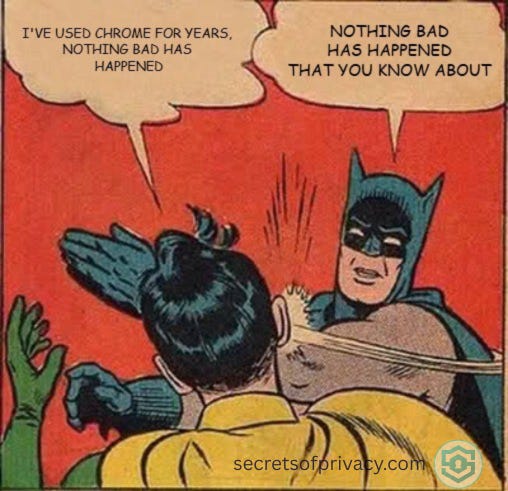
This is a Google Chrome Problem
Google built Chrome, and Google’s business model is advertising.
Chrome is the most widely used browser in the world, which means the data it makes available to websites (and to Google itself) flows at enormous scale. Google uses Chrome browsing data to inform its ad targeting systems. It has repeatedly introduced features that privacy advocates pushed back on, including a tracking system called the Privacy Sandbox that replaced third-party cookies not by eliminating tracking, but by moving it into the browser itself. Chrome still doesn’t block third-party tracking cookies by default, something Firefox, Brave, and Safari have done for years.
The extension architecture that makes LinkedIn’s scanning possible is a Chrome-specific design. Firefox and Safari expose extensions differently, which is why the scan doesn’t work there.
LinkedIn’s script actually checks whether you’re using Chrome before it fires. If you’re not using Chrome, nothing happens.
Now LinkedIn didn’t single out Chrome users. Chrome was simply the only browser where the technique works, and it covers roughly two thirds of all web traffic. That combination of architecture and reach is what made BrowserGate possible.
The scan list in this case started at 38 extensions in 2017. As is true with most privacy intrusions, it quickly grew. LinkedIn’s scanning now covers more than 6,000. Nearly a decade of growth, all enabled by the same Chrome design decisions that Google has never had much incentive to change.
So Which Browser Should You Use?
If you switch from Google Chrome to Firefox or Safari, LinkedIn’s scanning script simply doesn’t run. That’s the cleanest fix, though not our recommendation.
Brave is also a meaningful upgrade over Google Chrome. Now Brave detractors will tell you that Brave is a chromium based browser, which is true. But that’s a misleading story.
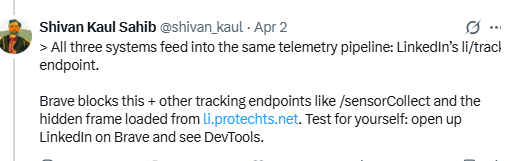
Yes, Brave is built on the same underlying engine as Chrome, so LinkedIn’s script does target it. But Brave blocks the tracking endpoints where the collected data gets sent. A Brave privacy engineer confirmed this publicly, and even told users they could verify it themselves by opening LinkedIn in Brave and watching the DevTools network tab. The data collection is interrupted before it leaves your browser.
So what’s the practical solution hierarchy here? Firefox or Safari stops the scan entirely. Brave stops the data from being transmitted. Whichever browser you choose, you’re in a substantially better position than Google Chrome users.
Our Recommendation on What You Can Do Right Now
Brave is our recommended primary browser, and BrowserGate is a good illustration of why.
While Brave is built on the same underlying engine as Chrome, Brave blocks the tracking endpoints where the collected data gets sent. And in the grand scheme of things, Brave is the best overall privacy browser around. The reasons for that deserve a separate post, which is in our queue.
Firefox stops the scan from running at all, since LinkedIn’s script checks for Chrome’s architecture before it fires. But as regular readers know, we don’t recommend Firefox as a primary browser since they’ve strayed from their privacy first ways. But keeping it installed and using it as a dedicated browser for sites like LinkedIn is a reasonable approach. Either way, Firefox is a better choice than Google Chrome for anything privacy-sensitive.
The bottom line:
if you’re using Google Chrome as your primary browser, you’re exposed to this LinkedIn scheme and to a long list of similar techniques that Chrome’s architecture enables. Switching to Brave costs you nothing and fixes the problem.
Switching browsers is one of the easiest first steps toward removing Google from your daily life entirely. If you want a full roadmap for doing that, I put one together, and it covers the browser switch and everything beyond it. Paid annual subscribers get it for free but everyone else can get it for 20% off here.

For further reading on the technical aspect of BrowserGate, check out this post from our friend Digital Mark:

Looking for help with a privacy issue or privacy concern? Chances are we’ve covered it already or will soon. Follow us on X and LinkedIn for updates on this topic and other internet privacy related topics.
Disclaimer: None of the above is to be deemed legal advice of any kind. These are *opinions* written by a privacy and tech attorney with years of working for, with and against Big Tech and Big Data. And this post is for informational purposes only and is not intended for use in furtherance of any unlawful activity. This post may also contain affiliate links, which means that at no additional cost to you, we earn a commission if you click through and make a purchase.
Privacy freedom is more affordable than you think. We tackle the top Big Tech digital services and price out privacy friendly competitors here. The results may surprise you.
Check out our new, free username generator to help you create unique usernames for different accounts. Reusing usernames is convenient, but terrible for your privacy. This tool makes it easy to create unique usernames on the fly.
Oh - and the class action lawsuits are already rolling in https://cyberinsider.com/linkedin-faces-class-action-over-alleged-covert-scanning-of-users-browsers/
Here’s the original bleeping computer article: https://www.bleepingcomputer.com/news/security/linkedin-secretly-scans-for-6-000-plus-chrome-extensions-collects-data/