

That Website Is Watching You Type (Yes, Really)
The hidden scripts capturing your keystrokes, mouse movements, and deleted text
Here’s a common scenario we can all relate to.
You’re browsing a website. You start filling out a form, then change your mind and close the tab.
No harm done, right? Not quite, as it turns out.
There’s a good chance that website recorded everything you did: your mouse movements, your scrolling, that half-typed credit card number you deleted, even that embarrassing search query you backspaced over.
We’re all familiar with increased AI driven surveillance in bricks and mortar retail stores. We’ve reported on that before.
And of course we all know about tracking pixels and cookies in the digital world. But most don’t know that websites are recording what you do live like an IRL security camera.
Welcome to the world of session replay tools.
What Are Session Replay Tools?
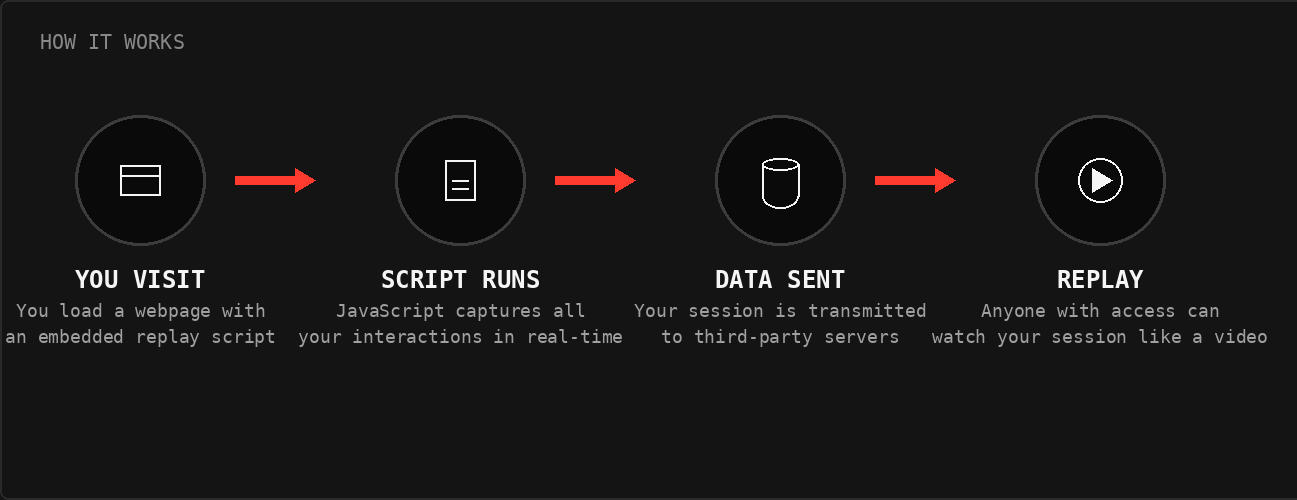
Companies like FullStory, Hotjar, LogRocket, and dozens of others offer a simple pitch to website owners: Watch your users like they’re sitting right next to you.
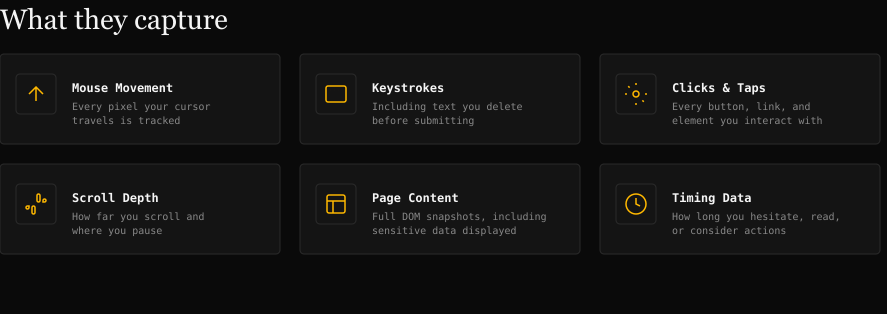
These tools embed invisible JavaScript on websites that captures:
Every mouse movement and click
Everything you type (including deleted text)
How far you scroll
Where you hesitate
Your entire journey through the site, reconstructed as a video
The marketing copy sounds benign: “Diagnose UI issues, improve support, and get context on nuanced user behavior.” And yes, these tools can legitimately help companies fix broken checkout flows or confusing navigation.
What these sites don’t mention to visitors, of course, is that you’re being filmed without your knowledge.
The Privacy Problem With Session Replay Tech
1. You probably have no idea it’s happening
Most websites bury session recording disclosure deep in privacy policies, if they mention it at all. There’s no recording indicator. No consent popup specifically for replay tools. You’re just being filmed.
2. Sensitive data leaks are common
In theory, these tools are supposed to mask passwords, credit card numbers, and personal data. In practice? A study by Princeton University researchers (source) found that session replay scripts on major websites were capturing:
Passwords in plain text
Credit card numbers
Medical information
Private messages
The researchers analyzed seven of the top session replay providers and found these scripts running on 482 of the top 50,000 websites, including sites belonging to The Guardian, Reuters, Samsung, Adobe, and Microsoft. The masking simply wasn’t working, or wasn’t configured at all.
3. Your “deleted” text isn’t deleted
Changed your mind about that angry customer service message? Decided not to enter your social security number? Too late. Session replay captures keystrokes in real-time. That text you backspaced over? It’s sitting on a third-party server.
4. Third parties now have your behavioral data
Your session isn’t just stored by the website you visited. It’s on FullStory’s servers, or Hotjar’s, or whoever else. That’s another company with your data, another potential breach vector, another privacy policy you never agreed to.
How Widespread Is This?
More than you’d think. Session replay tools are embedded on:
Major e-commerce sites
Banking and financial services
Healthcare portals
Government websites
News publications
The Princeton study found session replay scripts on nearly 1% of the top 50,000 sites, and that only covered seven session replay providers. The actual number is likely much higher. And adoption is growing: the “product analytics” market is projected to hit $20+ billion by 2028.
Want to see if a particular site uses session replay tech? The authors of the Princeton study created a neat search tool to do just that. The database is not 100% accurate, and doesn’t include every site, so use it more for fun than to make any decisions. Access it here.
What About Mobile?
If you’re thinking “I mostly browse on my phone, so I’m probably fine,” we have some bad news.
Mobile web browsers are just as vulnerable. The same JavaScript runs whether you’re on desktop Chrome or mobile Safari.
Mobile apps can be even worse. FullStory, LogRocket, and other providers offer mobile SDKs that record taps, swipes, and screen contents directly within apps. That banking app? That health tracking app? They could be recording your sessions too.
Blocking is harder on mobile. Most mobile browsers don’t support extensions like uBlock Origin. Safari on iOS and Chrome on Android offer no way to install content blockers that would catch these scripts.
No surprise to regular readers, but Brave mobile browser is the exception. Available on both iPhones and Android devices, it has the same aggressive built-in tracking protection as the desktop version, blocking many analytics and replay scripts without requiring any extensions.
Safari’s built-in Intelligent Tracking Prevention helps with some tracking, but it’s not specifically designed to block session replay tools.
The bottom line:
mobile users have fewer defenses unless they switch to Brave, and may face additional exposure through apps (which have their own session replay SDKs that browsers can’t block at all).
It's hard to grasp how invasive session replay is until you see it for yourself. So we built a tool that lets you experience it firsthand.
Access this interactive tool here.
Once you’re there, type in the form fields (don't worry, nothing is actually recorded or sent anywhere) and watch the "recording log" capture every character, every click, every hesitation. That’s what is happening all the time on major websites and mobile apps unless you have blockers in place.

What Won’t Help: VPNs
Some of you may be thinking (hoping?) that using a VPN will protect you here.
Unfortunately, that’s not the case.
A VPN hides your IP address and encrypts traffic between your device and the VPN server. But session replay scripts run inside your browser after the page has already loaded. The JavaScript executes locally on your device and captures your behavior directly. Your VPN never sees it.
Think of it this way: a VPN protects you from people watching the road between your house and your destination. But session replay is like someone already inside the destination, watching everything you do once you arrive.

What You Can Do About It
We have some good news. You can significantly reduce your exposure with some adjustments to your personal privacy stack. And many of you are already using tools and apps that will help you (so no significant change). Here are some options.
