

Is It Time to Leave Windows for Linux? A Privacy-First Guide
Why Linux finally became a realistic option, when Apple might make sense instead, and how to test Linux on your terms.
Most of us didn’t choose the operating system on our laptops and desktops.
We bought a computer, it came with Windows, and that was that.
For years, that was a perfectly reasonable default. While Windows would never be mistaken for a privacy friendly OS, it historically was not a data harvesting trap in the same way as Google Chrome. If you cared about privacy, you tightened browser settings, added a VPN, and optimized your settings.
Linux has been out there for quite a while now, but it wasn’t user friendly enough for widespread adoption. So even if you didn’t love what Windows was doing with telemetry and “personalization,” the practical move was to tweak Windows around the edges, not replace the OS.
If you really wanted out of Windows, the more realistic option was to buy an Apple device.
Apple has done a good job positioning macOS as the more privacy-respecting alternative with tighter sandboxing, strong on-device encryption, and a business model that doesn’t revolve around ads. For some people, that’s exactly the right call.
But macOS still has a relatively small share of the desktop and laptop market. Globally, it sits at about 16%, though gets as high as 30% in the United States. There are a few reasons for this:
Cost: buying into the Apple ecosystem often means replacing hardware that still works.
Lock-in: you’re trading one giant vendor for another, just with nicer industrial design.
Flexibility: fewer hardware choices, fewer ports, less freedom to tinker.
Transparency: macOS is still closed source; you’re ultimately trusting a black box, just a different one.
For a long time, OS-level privacy felt like a binary:
accept Windows and fight it, or jump to Apple and accept the lock-in.
But things have changed quite a bit in the last few years.
Windows 10 has hit end-of-support. Windows 11 comes with stricter hardware requirements, deeper cloud tie-ins, and a clear push toward an AI-driven, “agentic” desktop that observes and assists by design. And who can forget the rollout of Windows’ “Recall” feature that takes snapshots of your desktop.

At the same time, Linux has quietly matured into something much more approachable and user friendly. Newer iterations of the OS have polished desktops, easier installers, better hardware support, and serious adoption outside hobbyist circles. One new claim puts Linux’s true market share at around 11% of all desktops and laptops. (Source)
While Linux is moving into the mainstream, it doesn’t mean everyone should switch, at least not right away. It does mean that if you care about privacy and you’re already being nudged into a big decision about your computer, it’s worth running the numbers.
In this post, we’ll:
Show what actually changes for your privacy if you move from Windows to Linux.
Be honest about the effort involved
Explain when Linux is a high privacy ROI move (and when it’s overkill).
Highlight a more turnkey option: buying a device with Linux pre-installed from a retailer like Private Phone Shop, so you don’t have to touch installers at all. (Private Phone Shop - Affiliate link)
You don’t need to be a hardcore tinkerer to follow along. But you do need to be willing to question the default you’ve lived with for years.
Why Linux is Suddenly Everywhere in 2025
For years, desktop Linux hovered in the low single digits. It was “always the future,” never quite the present.
That’s changing.
The ZDNet piece you saw floating around made a simple move: instead of only counting “classic” desktop Linux, it added ChromeOS (Linux kernel, Chrome shell) and a big chunk of “unknown” systems that look a lot like Linux in the data. Taken together, that gets you to roughly 11% of the desktop/laptop market.
You don’t need to buy the exact number to see the direction:
Windows 10 support has ended. Microsoft now treats Windows 10 as past end-of-life. There are paid (and in some cases conditional “free”) Extended Security Updates, but that’s a holding pattern, not a future.
Extended support is tightly tied to the cloud. Microsoft increasingly requires you to link your machine to a Microsoft account and sync data to the cloud in exchange for one more year of security updates.
Windows 11 has stricter hardware requirements. TPM 2.0 and supported CPU lists lock out a lot of otherwise-capable Windows 10 machines.
Windows is becoming more “agentic” and AI-centered. Microsoft’s own messaging emphasizes Windows as a cloud-connected, AI-assisted platform with Copilot and related features living close to the center of the experience.
On the other side:
Mainstream Linux distributions have become much easier to install and use.
Hardware support is dramatically better than it was a decade ago.
Gaming support has improved.
And privacy and data control have become mainstream concerns, not niche worries.
Zooming out, governments and large organizations are starting to move too. Several European regions and agencies are actively shifting away from Microsoft stacks toward Linux and LibreOffice as part of broader “digital sovereignty” strategies, driven by concerns about foreign control, vendor lock-in, and data flows outside their jurisdiction.
When governments, enterprises, and everyday users all start pulling in the same direction, it signals something structural is happening.
Quick Note: What About Just Buying a Mac?
Before we go deeper into Linux, let’s talk about the “Apple option” explicitly.
For many privacy-conscious people, macOS is a valid and sensible escape hatch:
Apple’s business model doesn’t depend on ad targeting in the way Microsoft and Google’s do.
macOS ships with strong defaults around disk encryption and app sandboxing.
Apple has invested heavily in privacy branding and on-device processing.
If you:
Can afford new Apple hardware,
Don’t mind living inside a relatively closed ecosystem, and
Don’t care much about open source or running on your existing PCs,
then “move to Mac” might be the least-friction path off Windows.
But it’s not free of tradeoffs:
You’re still centralizing a lot of trust in a single, closed-source vendor.
You’re buying into specific hardware and form factors at Apple’s price points.
You’re still tying large parts of your life to a big US tech company with its own incentives.
This post focuses on Linux because it answers a different question:
What if I want my desktop to be more open, more inspectable, less tied to any one vendor, and more reusable with the hardware I already own?
What Actually Changes For Your Privacy on Linux
Before you spend hours researching distros or shopping for a Linux laptop, it’s worth asking a simpler question:
if you stick with Windows versus moving to Linux, what actually changes about who can see your activity, what gets collected in the background, and how much control you have over the data your computer quietly emits every day?
How Windows behaves
On a modern Windows machine, it’s hard to avoid:
Telemetry and diagnostics flowing back to Microsoft, even if you set them to “basic.”
A strong push to sign in with a Microsoft account, linking your OS, app store, OneDrive, and often your browser profile.
Advertising and “recommendations” woven into the Start menu, lock screen, and apps.
A growing stack of AI features (Copilot and friends) that depend on collecting more behavior data over time.
You can dial parts of this down. But it’s work, and new features tend to ship with data collection turned on.
How Linux behaves
On a mainstream Linux distribution (Linux Mint, Ubuntu, Zorin, etc.) the baseline is different:
There’s no OS-level ad platform trying to monetize your attention.
The default apps are generally open source and not wired into a single corporate data pipeline.
You choose which online accounts (if any) to connect to your desktop.
Updates are about security and features, not about new ways to show you things.
Linux doesn’t magically make you anonymous. Your browser, search engine, email provider, and habits still matter.
But swapping out Windows for Linux removes a constant, baked-in flow of telemetry from the foundation of your system. That’s a big change.
It matches one of the core Secrets of Privacy beliefs:
The less data you leak by default, the harder you are to profile, target, or surprise later.
Linux is a bigger move than, say, switching browsers. But it’s the same pattern: choose tools that answer to you first, not to an advertising roadmap.

Who Is A Good Candidate For Linux (and who isn’t)
You don’t have to become “a Linux person” to benefit from it. What matters is your actual use pattern.
Strong candidates
1. The stuck-on-Windows-10 professional
Your laptop or desktop still runs fine.
Windows 11 is either unsupported or feels like a step backward.
Most of your work happens in the browser, email, PDFs, and simple documents.
For this group, moving to Linux is often a high privacy ROI move: you keep your hardware, cut down on tracking, and get a modern OS without being pulled deeper into the Windows 11 ecosystem.
2. The browser-first worker
You live in web apps. Think webmail, Canva’s online version, cloud based office documents, etc.
You rarely rely on Windows-only desktop apps.
You’re already halfway to being OS-agnostic. Switching the underlying OS to Linux mostly changes the look and feel of your desktop, not where your work lives.
Mixed cases
3. Specialists with one or two Windows-only apps
Legal, medical, finance, or design software that exists only on Windows.
Niche hardware with Windows-only drivers.
You still have options: dual-boot, a second machine, or running Windows in a virtual machine for that one tool. But you want to go slowly and test before you commit.
4. Gamers and creative pros
Linux has made real progress here. But if gaming or Adobe Creative-heavy work is the center of your world, Linux may not be a practical switch.
Probably not worth it (for now)
5. Shared family PCs with very low tech tolerance
If three people just want things to “look normal” and never change, dropping Linux onto the shared family machine may create more friction than benefit.
You can still move your primary machine to Linux and leave the shared one alone.
Practical privacy doesn’t mean forcing everyone around you into a complete OS change before they’re ready.
What Day-to-Day Life on Linux is Like
If your mental image of Linux is a green terminal with a blinking cursor, it’s time to update that. Modern desktop Linux looks and feels like any other mainstream OS.


Rough mapping:
Start menu / taskbar → application menu and panel/dock.
File Explorer → a file manager like Nemo (Linux Mint), Dolphin (KDE), or Nautilus (GNOME).
Microsoft Store → your distro’s “Software Center” where you can search for and install apps.
Microsoft Office → LibreOffice, OnlyOffice or Proton Docs
Outlook → Thunderbird or webmail like Proton Mail. .
Updates usually go through a single, centralized mechanism: your OS and most of your apps update together. No surprises like on Windows where a new assistant suddenly appears in your taskbar.
The difference most people notice isn’t visual. It’s the absence of constant prompts to sign in, sync, or enable “experiences.”
Low-Risk Ways to Try Linux
Instead of touching your main machine, the simplest way to get a feel for Linux is to install it on an older laptop or spare desktop you’re not relying on every day. Most of us have something like this lying around. As long as it powers on and can connect to Wi-Fi or Ethernet, it’s probably good enough for a test.
The first step is to clear that machine for reuse. Copy any files you care about to an external drive or cloud storage. Once you’re comfortable that there’s nothing irreplaceable left, you can treat the device as a clean slate. This alone is a small privacy win:
you’re taking a machine that might otherwise be sold, recycled, or handed down with old data still on it and deliberately wiping it.
From there, you pick a beginner-friendly Linux distribution and give it a real shot. Download something like Linux Mint, Ubuntu, or Zorin OS on your main computer, create a bootable USB stick with a tool like Rufus or Balena Etcher, then plug that USB into the old laptop and boot from it. The installer will walk you through language, keyboard, Wi-Fi, and disk options. On a test machine, you can keep things simple and let Linux take over the whole drive. You’re not trying to preserve a Windows setup here. Instead, you’re turning the device into a dedicated Linux box.
Once the install finishes, treat that older PC as your “Linux daily driver” for a while. Use it for email, browsing, document editing, and basic productivity. Install your password manager, set up your VPN, and sign in to the same web tools you use on your main machine. The goal isn’t to stress-test every possible edge case. It’s to answer a few practical questions:
Does the hardware behave?
Do you like the desktop environment?
Does anything you do every day feel impossible, or just different?
This approach keeps the stakes low. Your primary Windows machine stays untouched while you try out Linux. If something breaks or you make a mistake, you’re not scrambling to fix your work PC before a deadline. If, after a few weeks, you find yourself naturally reaching for the Linux laptop because it feels calmer and less pushy, that’s valuable signal. At that point, deciding whether to migrate your main machine (or buy a pre-installed Linux system) is an informed choice, not a leap of faith.
Skip the Installer and Buy a Linux Laptop That Works Instantly
If you’re turned off by the idea of installing Linux on your own, there is an easier path: buy a device that ships with Linux, already configured.
One example is Private Phone Shop, which regular readers may recognize. The owner has written a guest post for us before and we purchased our most recent de-Googled smartphone from the Private Phone Shop.
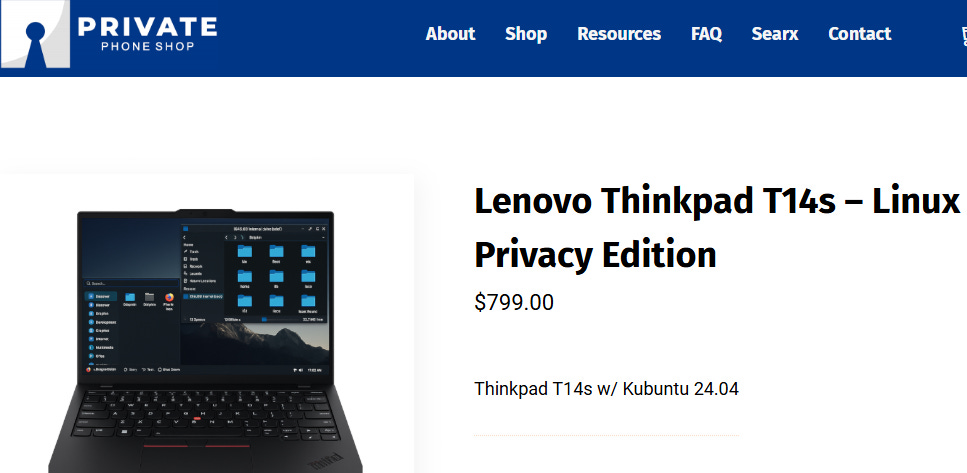
In addition to privacy-focused Android devices, they sell a Lenovo ThinkPad T14s – Linux Privacy Edition that arrives with Kubuntu 24.04 (a flavor of Ubuntu) pre-installed and a curated set of privacy tools. Check it out here.
A few details that make that interesting for non-technical buyers:
It’s a business-class ThinkPad, not a mystery brand. Rugged chassis, 16GB RAM, 1TB storage, 14” IPS display.
The machine ships ready to use: OS installed, drivers working, and privacy-friendly apps (like Brave, Signal, Mullvad, and encrypted storage tools) already in place.
Every T14s purchase unlocks a step-by-step “Intro to Linux” video course. Short videos walk you through the desktop layout, installing apps, keeping things updated, file system basics, and light command line usage
You will pay more than you would by buying used hardware and doing everything yourself. In exchange, you get:
Time back.
Fewer ways to misconfigure something critical.
A gentler on-ramp if Linux feels intimidating but you do want the benefits.
If your billable hour is worth a lot, paying for a ready-to-go Linux machine can be a very reasonable move.
How Linux Fits Into a Broader Privacy Strategy
Linux is not about being “pure” or “off-grid.” It’s about shifting your baseline. From a Secrets of Privacy perspective:
You don’t need to go off-grid.
Switching your desktop OS to Linux is a practical move. You can still use mainstream tools in the browser and keep your workflows intact.The less you leak, the harder you are to target.
Getting away from an ad-driven, telemetry-heavy OS removes a major passive data stream. That makes profiling, tracking, and some types of attacks harder.Small upgrades stack into big privacy wins.
Moving to Linux can be one of the bigger upgrades. But it plays best as part of a stack:
Hardened browser and search setup
Password manager and strong authentication
Email aliases and smarter inbox hygiene
A more private phone (de-Googled Android, or at least a tightened-up stock device)
Better habits around what you share and where
Linux is simply one layer in that larger “become a harder target” strategy.
A Simple Next-Step Plan
If you’re even mildly curious about trying out Linux, here’s a suggested path:
Do a 15-minute audit.
List the apps you rely on weekly. Mark which ones are web-based already and which are truly Windows-only.Decide your approach.
If you enjoy tinkering and your hardware is straightforward → try a repurposed machine.
If you’re time-poor and privacy-motivated → consider a pre-installed Linux laptop from a vendor like Private Phone Shop and treat it as your “privacy-first daily driver.”
Give it a 30-day trial.
Use Linux for as much of your day-to-day work as possible for a month. Keep Windows around only for the handful of tasks that truly require it.Report back.
If you’re a Secrets of Privacy reader making the leap, we’d love to hear your experience. What worked, and what doesn’t, and where do you still feel stuck. Your stories help shape follow-ups like that benefit the entire Secrets of Privacy community.
You don’t need to switch operating systems tomorrow to be serious about privacy. But if you’re already being pushed into a big decision by Windows, it’s worth asking whether that decision could leave you with more control over your data instead of less.
As always, the goal isn’t perfection. It’s to keep stacking privacy wins until you’re a much harder target than you were before.
Friendly Ask
If you found this helpful or informative, chances are your friends and family will as well. Please share it with them to help spread awareness.
Looking for help with a privacy issue or privacy concern? Chances are we’ve covered it already or will soon. Follow us on X and LinkedIn for updates on this topic and other internet privacy related topics.
Disclaimer: None of the above is to be deemed legal advice of any kind. These are *opinions* written by a privacy and tech attorney with years of working for, with and against Big Tech and Big Data. And this post is for informational purposes only and is not intended for use in furtherance of any unlawful activity. This post may also contain affiliate links, which means that at no additional cost to you, we earn a commission if you click through and make a purchase.
Privacy freedom is more affordable than you think. We tackle the top Big Tech digital services and price out privacy friendly competitors here. The results may surprise you.
Learn how email tracking pixels work, what data they reveal, and the best ways to block them to protect your inbox privacy.

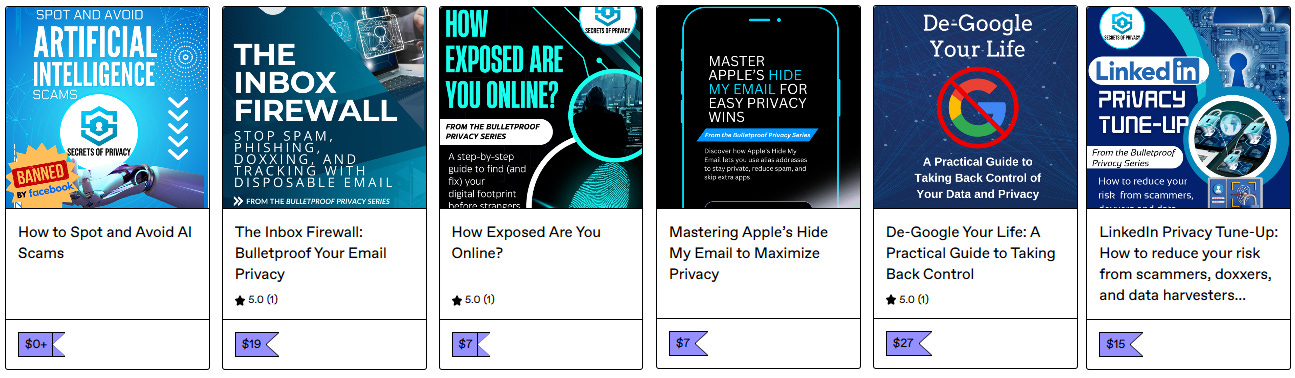
Check out our specialized privacy and security guides in our digital shop. Below is a sample of what’s available. People are really loving the De-Google your Life Guide (available here at 25% off). Browse all the guides here. Annual paid subscribers get all the guides for free with their subscription (worth $115+).
If you’re reading this but haven’t yet signed up, join for free (3.7 K+ subscribers strong) and get our newsletter delivered to your inbox by subscribing here 👇
Apple is not a viable option. I'm in the process of dumping my last Apple device, a laptop that just had Apple "lose" all my icloud data (no recovery!) and my Desktop folder/subfolders with 20k files. Fortunately, I have most backed up. I've been Linux desktop (Ubuntu), Framework laptop (Fedora) and Graphene private phone. Daily driver phone is Android Pixel 7. Apple also kicks out companies with privacy apps. You will have to go Linux if you want to keep control of your data.
I switched old PC to Ubuntu and it works well so far. Doesn’t have the aesthetically pleasing look of windows or apple but getting used to. Some proton features don’t work as well and it’s a very primitive look to the vpn however I messaged proton and they said they are working on making Linux vpn have similar look to windows version. Hopefully with secure core available. No option for proton drive yet so you have to login to website.