

Your Password Manager Made a Promise It Might Not Be Able to Keep
Researchers at ETH Zurich and USI found 27 ways a compromised server could reach into Bitwarden, LastPass, Dashlane, and 1Password vaults.

A few months back I wrote about infostealer malware. That’s where malicious code sits quietly on your device and copies every saved password out of your browser. My advice then was to get a real password manager and stop letting Chrome or Safari hold your logins for you.
That advice still holds. But a study published in February by researchers at ETH Zurich and the Università della Svizzera italiana (USI) looks at the same problem from a different POV. Those researchers found that this time the weak point sits with the password manager provider, not your device.
Researchers at ETH Zurich and USI built a specific test scenario.
What happens to your vault if the company’s own server gets compromised? In other words, the backend infrastructure itself is breached rather than a phished employee or a stolen laptop.
Under that scenario, they found 27 distinct attacks across Bitwarden, LastPass, Dashlane, and 1Password that could let an attacker read, alter, or steal what’s sitting in a user’s password vault.
This is important because it undermines a key promise all four companies make in their marketing. “Zero-knowledge encryption” is supposed to mean the company itself cannot read your data. This research shows the promise is not entirely accurate.
Two Locks, Not One
A cloud password manager has two separate places where something can go wrong.
One is your device, where malware or a compromised browser extension can grab data before it’s ever encrypted. That’s the infostealer threat, and it’s the one most security advice already covers.
The other is the provider’s server. Your vault sits there encrypted, and “zero-knowledge” is a claim about what that server can and cannot do with it. In theory, the server never sees your master password and never holds the key to unlock your data. In practice, the ETH Zurich and USI researchers found that if the server sends your password manager's app something other than what it's expecting, that guarantee can break down in several different ways.
Zero-knowledge encryption claims assume the server behaves perfectly at all times. It ignores what happens if the server, or someone who’s compromised it, starts acting maliciously. And that’s where the risk with password managers lies.
What the Study Found
The researchers grouped the 27 attacks into four broad categories, and you don’t need the technical names to understand the problem.
The first is about account recovery. Bitwarden and LastPass both let you get back into your vault if you forget your master password, and that recovery process opens a second door into your data. The researchers found that if the server itself is acting maliciously, it can exploit that recovery process to get into your vault without ever needing your actual password.
The second is about how these services store your data internally. Instead of locking your whole vault as one sealed unit, some of them encrypt each saved item separately, and the labels and descriptions attached to those items aren’t always fully protected either. That let researchers quietly swap the contents of two entries, or weaken the encryption on a single item, without anything looking different on your end.
The third involves sharing. When you share a login with a family member or a coworker, that feature creates a new pathway into your data, and several of the flaws let a compromised server tamper with who actually ends up with access.
The fourth comes down to old code. Bitwarden and Dashlane both still run legacy systems to support accounts that have been around for years, and a malicious server can use that leftover code to quietly push an account back onto weaker, outdated encryption.
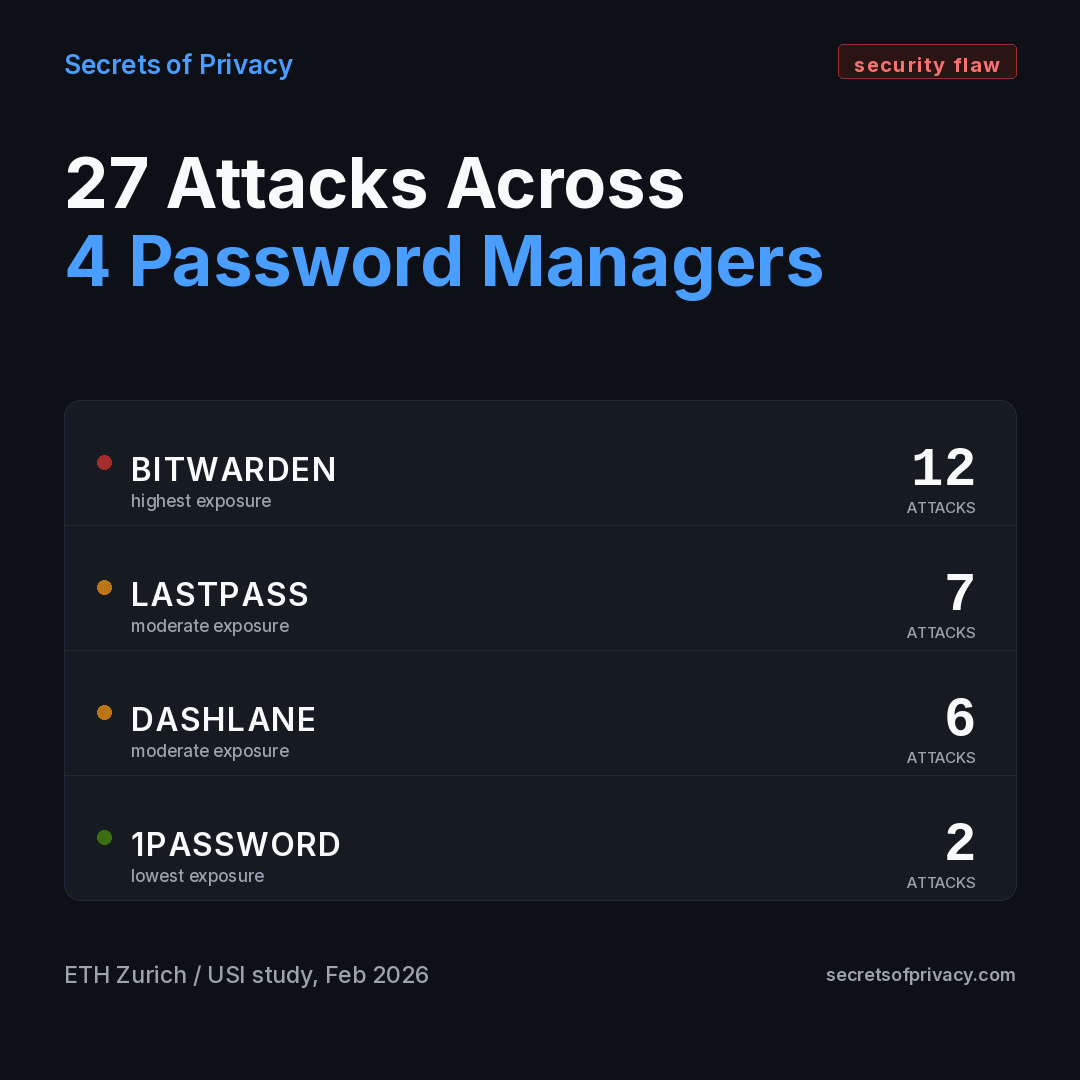
Bitwarden had the most exposure at 12 separate attack paths. LastPass had seven, Dashlane had six, and 1Password had two. That difference makes sense when you dig into the details of each provider.
1Password adds an extra, high-entropy key on top of your master password when it encrypts your data, something the other three don’t do by default. That one design choice closes off a significant risk compared to what the researchers found elsewhere. 1Password isn’t fully immune either, but that extra key gives it a real structural advantage the other three don’t have.
One name conspicuously missing from that list is Proton Pass. It wasn’t part of the study, and from what I can tell that’s mostly a timing issue. Proton Pass is newer than the other four and probably wasn’t in scope. That’s not the same as giving Proton Pass a passing grade.
Proton built its account recovery around a key that the user holds and the company says it never keeps a copy of, which, if it works the way Proton describes, would sidestep the key escrow category specifically. To my knowledge, Proton hasn’t gone through the kind of adversarial testing the other four just did. If you’re already on Proton Pass because it fits the rest of your privacy stack, that’s a reasonable call. Just don’t read its absence from this paper as a clean bill of health.
All four vendors that were tested have confirmed they’re patching what the researchers found. None of this exposure happened in the wild, though. Every one of these 27 attacks needed a compromised server to actually work, and none of the four companies has reported that ever happening. What the paper proved is that the attacks are possible, not that anyone pulled them off.
I want to flag something none of the tech coverage is asking. These companies aren’t just making a technical claim when they advertise “zero-knowledge encryption.” They’re making a representation to paying customers about what the product actually does. The FTC has gone after companies before for security claims that didn’t hold up, and consumer protection statutes generally don’t require proof of an actual breach, just proof that the representation was false or misleading when it was made. I haven’t reviewed any of these four companies’ terms of service for this piece, and I’m not your lawyer, so I’m not saying anyone has a case. But I’m interested how the marketing language shifts over the next few months. If the wording around “zero-knowledge” gets quietly softened without an announcement, that tells you something.
My Take
Put the infostealer piece and this study together and you get a fuller picture of what a password manager actually is. It was never one single point of trust. It’s two separate trust relationships stacked on top of each other, one with your own device staying clean, and one with a company you’ve never met promising its backend won’t turn on you. Most advice, mine included, has spent years focused on the first one and treated the second as settled.
Panic is not the appropriate reaction here. And I especially don’t think it’s a mass migration to KeePass, which I’ve seen floating around the privacy subreddits since this story broke. Self-hosting trades one set of risks for a different set. No one patches the software for you, syncing is something you now have to configure yourself, and if your own backup habits slip, there’s no vendor safety net underneath you. For most people that’s a worse deal, not a better one.
What I do think happens over the next year is these companies quietly get better, because now there’s a public paper naming the exact weaknesses and a research team that will presumably check whether the fixes hold. That’s a positive development and makes this segment of the privacy tech space stronger.
As I’ve said before, privacy and security is a cat and mouse game. Even if these vulnerabilities get patched, that doesn’t make password managers 100% effective going forward. New vulnerabilities will be discovered and AI makes it easier than ever to exploit those quickly once discovered.
So what’s the fix? How do you future proof yourself as much as possible?
There are real fixes, ones that don’t involve switching providers or moving your whole vault somewhere else. It comes down to a few targeted changes, and I’ll walk through exactly what that looks like below.
What Actually Protects You
