

iPhone vs Android Privacy and Security in 2026: Here's Which One Wins
A practical comparison of iPhone and Android privacy features, data collection, and security in 2026 to help you decide which platform protects you better.
iPhone and Android are not equal for privacy and security in 2026. Apple has a real structural advantage, but it's smaller than Apple's marketing suggests, and one Android configuration changes the comparison entirely.
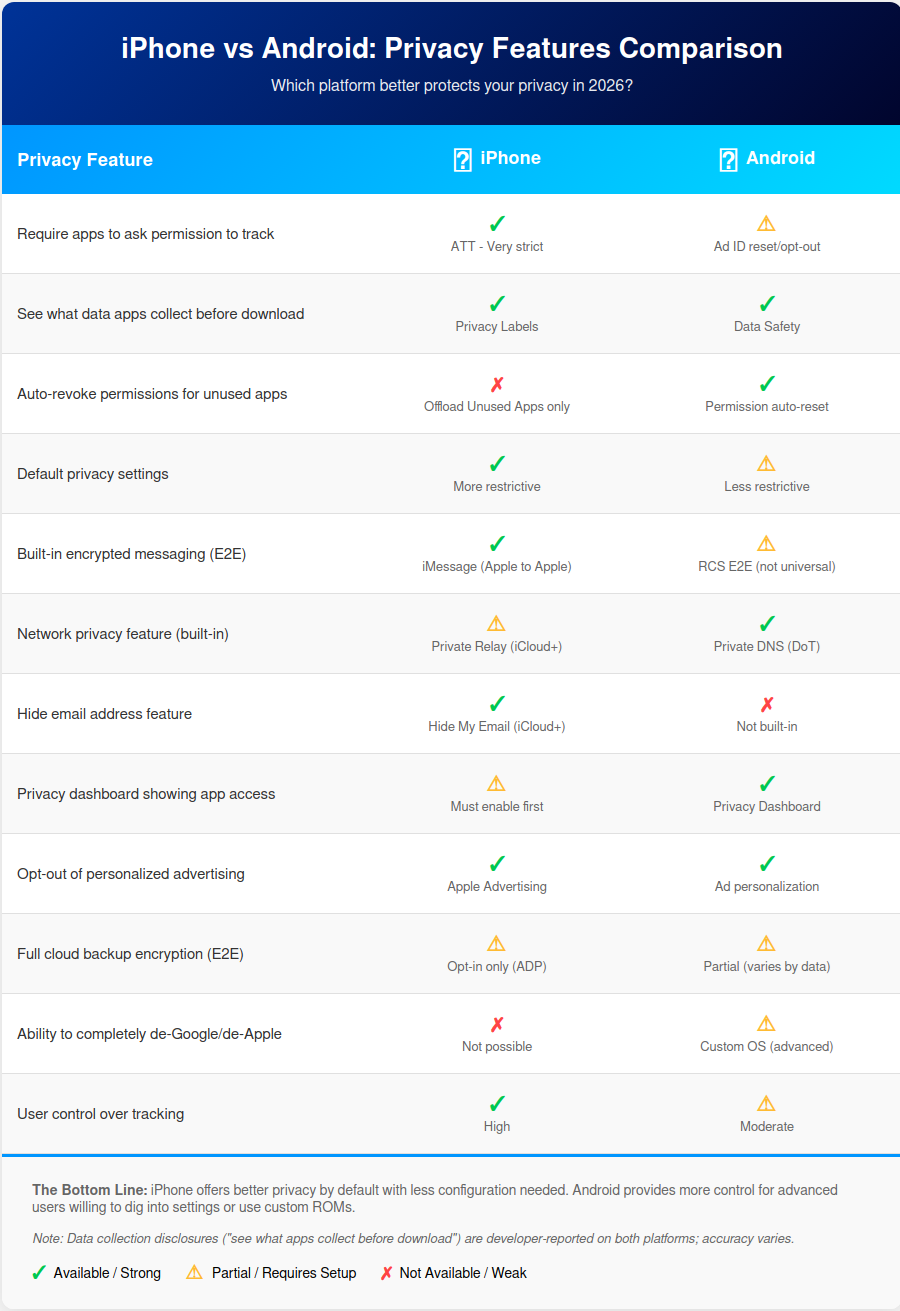
Both platforms have made real privacy improvements in recent years, and both still carry significant trade-offs. By the end of this post you'll know which one fits your specific needs, and what actually matters when making that call. There's a summary graphic at the end worth saving.
The Privacy Landscape Has Changed
Both Apple and Google have made major privacy moves in recent years. Apple’s App Tracking Transparency disrupted the ad industry in 2021. Google announced Privacy Sandbox on Android in February 2022. In October 2025, Google said it would retire most of the proposed Android Privacy Sandbox ad APIs (including Topics, Protected Audience, and Attribution Reporting).
But at the end of the day, marketing claims don’t equal reality. What actually counts is data collection practices, default settings, and who controls your information. The answer to “which is more private?” isn’t as simple as “iPhone good, Android bad.”
Data Collection: What Each Company Actually Takes
Apple’s Data Collection
Let’s be clear: Apple still collects data, just differently than Google. Here’s what Apple collects:
Device analytics and diagnostics
Siri voice data (processed on-device when possible, but some queries go to servers)
App usage patterns through App Store
iCloud data: photos, backups, documents
Apple Pay is designed so Apple doesn’t retain card transaction information that can be tied back to you, though merchants and banks/issuers still have the transaction details.
Location data when using Apple services
The myth that “Apple doesn’t track you” needs clarification. Apple tracks you, they just don’t sell that data to third parties or use it primarily for advertising. They use it to improve services, for fraud prevention, and for their own advertising platform (which is growing).
Google’s Data Collection
Google’s business model is fundamentally different. Advertising generates over 75% of their revenue, which requires user data. Here’s what Google collects:
Search history and queries
Location history (even when apps are closed, if enabled)
YouTube viewing habits and search history
Gmail content is still processed automatically for spam/security and smart features (like Smart Compose), but Google says it doesn’t use Gmail content to personalize ads.
Google Photos, Drive, and cloud service data
Cross-service tracking within Google’s ecosystem
Chrome browsing data (if signed in)
Google provides more transparency tools to see and manage this data than Apple does, but they also collect significantly more data across more services.
The Verdict
Neither platform is “zero collection.” The key difference is purpose and transparency:
Apple: Collects data primarily for improving services; doesn’t sell to third parties
Google: Collects data to power targeted advertising (their core business)
You probably picked up on this already, but if you use Gmail, Google Maps, Chrome, and YouTube heavily, switching to iPhone doesn’t eliminate Google’s tracking of you. You’re just using Google services from a different device.
Third-Party App Privacy: The Real Battleground
App Tracking Transparency (iPhone)
Apple’s ATT framework, launched with iOS 14.5 in 2021, requires apps to ask permission before tracking you across other companies’ apps and websites.
How it works in 2026:
Apps must show a standardized prompt asking for tracking permission
Users choose “Allow” or “Ask App Not to Track”
Average opt-in rate in 2025: around 35% overall (varies widely by app category)
Gaming apps see the highest opt-in rates (37-50% depending on genre)
News and medical apps see very low rates (under 10%)
The reality: ATT significantly disrupted the mobile ad industry, but it’s not perfect. Apps found workarounds through fingerprinting and probabilistic tracking. Plus, it only applies to third-party tracking. Apple can still track you within their own ecosystem.
Google’s Privacy Approach on Android
Google took a different path with Privacy Sandbox for Android, announced in 2022. The goal was to phase out the Advertising ID (GAID) while providing privacy-preserving alternatives through APIs like Topics and Protected Audience.
The 2025 update: In October 2025, Google deprecated most Privacy Sandbox technologies for Android, including Topics, Protected Audience, and Attribution Reporting. This was due to low adoption rates and ecosystem feedback. The Advertising ID remains available, though Google provides controls to limit ad personalization.
Current Android privacy controls:
Permission auto-reset for unused apps
Approximate location option (not precise)
Privacy Dashboard showing which apps accessed what data
One-time permissions for camera, microphone, location
Ability to turn off ad personalization (but not data collection)
Side-by-Side Comparison
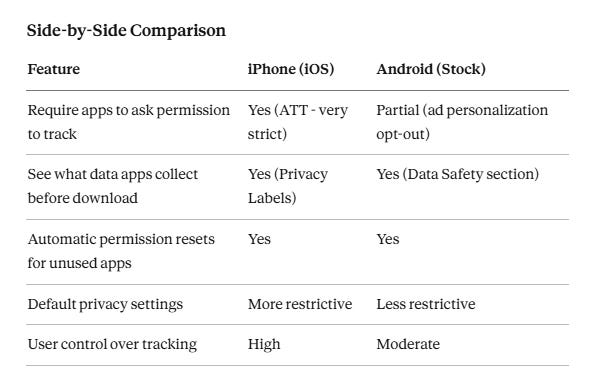
Key insight: iPhone’s walled garden means more consistent app privacy enforcement. Android’s openness means more control for advanced users willing to dig into settings, but weaker defaults for everyone else.
The Android Wild Card: Custom ROMs
For advanced users only, Android offers something iPhone never will: complete control through custom operating systems.
Popular privacy-focused Android ROMs:
GrapheneOS: Maximum security and privacy; only works on Google Pixel phones as of publication
CalyxOS: CalyxOS supports Pixel phones and a smaller set of other devices, depending on the current support list.
LineageOS: Runs on many devices but requires technical knowledge
The nuclear option: Complete de-Googling. You can run Android without any Google services using these ROMs with alternatives like F-Droid for apps.
Why 99% of users won’t do this:
Requires unlocking bootloader (security risk)
Technical installation process
Many mainstream apps won’t work properly
Sacrifices significant convenience
But it’s worth knowing the option exists if privacy is your absolute top priority and you’re willing to sacrifice convenience.

Built-in Privacy Features: Head-to-Head
iPhone Privacy Features (2026)
Hide My Email (iCloud+ subscription): Generate random email addresses for signups
Private Relay (iCloud+ subscription): VPN-like protection for Safari traffic
On-device processing: Photos facial recognition, Siri requests when possible
App Privacy Report: See which apps accessed your data recently
Lockdown Mode: Extreme protection for high-risk users (disables many features)
Safari privacy protections: Intelligent Tracking Prevention, fingerprinting resistance
Mail Privacy Protection: Hides IP address and loading activity from senders
Android Privacy Features (2026)
Permission auto-reset: Automatically revoke permissions for unused apps
Approximate location: Share general area instead of precise location
Privacy Dashboard: Visual timeline of app permissions usage
One-time permissions: Grant temporary access to camera, mic, location
Sensitive permissions notifications: Alerts when apps access camera/mic in background
Chrome privacy improvements: Enhanced Safe Browsing, Privacy Sandbox (deprecated but some features remain)
Default Settings Matter
This is crucial:
A fresh iPhone out of the box is configured more privately than a fresh Android phone.
iPhone defaults:
Location sharing off for most apps
App Tracking Transparency requires explicit opt-in
Randomized MAC addresses when joining Wi-Fi networks
iCloud Private Relay available (if subscribed)
Android defaults:
Some Google services enabled by default
Ad personalization on (must manually opt-out)
Location history can be enabled during setup
Google account sign-in strongly encouraged
The setup test: iPhone requires fewer privacy-related configuration steps after unboxing.
Encryption & Security
End-to-End Encryption
iMessage:
E2E encrypted by default between Apple users
MAJOR CAVEAT: iCloud backups are NOT end-to-end encrypted unless you enable Advanced Data Protection (available since late 2022, but opt-in only)
Most users don’t enable Advanced Data Protection, meaning Apple can access their iMessage history through backups
RCS on Android:
Google Messages can provide end-to-end encryption for some RCS chats, but it isn’t universal across all RCS implementations or cross-platform conversations.
Fragmented: not all carriers/devices support it fully
SMS fallback is not encrypted
Device Encryption
Both platforms use full-disk encryption by default:
iPhone: Secure Enclave chip handles encryption keys
Android: Varies by manufacturer; Google Pixel uses Titan M2 security chip
Both are strong, but implementation quality varies more on Android due to hardware fragmentation.
Biometric Security
Face ID vs Face Unlock: Both secure, but Face ID is generally considered more reliable
Fingerprint sensors: Available on both; quality varies by device
Law enforcement consideration: In the US, courts have ruled you can be compelled to unlock with biometrics (5th Amendment doesn’t protect) but not with passcodes. This is an evolving area of the law.
Remember: Security and privacy are related but different. You can have a very secure phone that still collects tons of data about you.

Quick side note…
We’re building a new privacy tool and need to know:
Would you rather have a comprehensive doxxing risk assessment, or a LinkedIn privacy scanner?
Quick 2-minute survey 👉 here 👈 (responses are anonymous unless you provide your email). Your answers determine what gets built.
The Ecosystem Lock-in Factor
Apple’s Ecosystem
The convenience features that make Apple devices work together also create privacy trade-offs:
iCloud integration: Easy sync, but requires trusting Apple with your data
iMessage/FaceTime: Keep you using Apple devices (and locked out of cross-platform standards)
AirDrop, Handoff, Continuity: Seamless device interaction, but Apple knows which devices you own
Family Sharing: Convenient, but location sharing is enabled by default
Google’s Ecosystem
Google’s services are cross-platform, which is both good and bad for privacy:
Gmail, Drive, Photos: Work everywhere, but Google tracks everything
Cross-device syncing: Seamless, requires Google account
Smart home integration: Extensive, but everything flows through Google servers
Android Auto, WearOS: Deep integration requires data sharing
Critical Question:
Does your phone manufacturer even matter if Google services dominate your digital life? Most iPhone users still use Gmail, Google Maps, YouTube, and Chrome. If that’s you, you’re giving Google most of your data anyway, just from a more expensive device.

Transparency & Trust
Apple’s Privacy Promises
Apple’s marketing: “Privacy is a human right.” Here’s reality:
Actual privacy policy is complex and lengthy (like all tech companies)
Recent controversies: Proposed CSAM scanning system (paused after backlash), China iCloud data stored with state-run company
Advanced Data Protection for iCloud is NOT enabled by default (most users don’t even know it exists)
App Store privacy labels rely on self-reporting by developers
Apple’s approach: “Trust us, we’re the good guys.” And mostly, they follow through, but trust requires verification.
Google’s Transparency
Google’s approach: Surprisingly detailed controls, if you know where to look.
Transparency features:
Detailed privacy checkup tool
Ability to download all your data (Google Takeout)
Privacy controls scattered but fairly comprehensive
Transparency reports about government requests
The contradiction: Privacy tools from an advertising company. It’s like a casino offering gambling addiction resources. It’s helpful, but fundamentally conflicted.
The Trust Question
Who do you trust with your data?
The company that sells $1,200 phones (hardware profit model)
The company that sells targeted advertising (data profit model)
Neither answer is wrong, it depends on your threat model and priorities.
Real-World Privacy Scenarios
Scenario 1: The Privacy Minimalist
“I just want a phone that doesn’t track me by default, and I don’t want to configure anything.”
Winner: iPhone
Why: Better privacy defaults, less configuration required, App Tracking Transparency provides meaningful protection with zero effort.
Trade-off: Higher cost, locked into Apple ecosystem.
Scenario 2: The Google Power User
“I live in Gmail, Google Photos, YouTube, and Google Drive. I use Google Assistant daily.”
Winner: Android (Google Pixel)
Why: You’re giving Google all this data anyway. Might as well get better integration and pay less for hardware. Using these services on iPhone doesn’t make them more private.
Trade-off: Google knows everything about you.
Scenario 3: The Privacy Maximalist
“I want ZERO data collection. I’ll sacrifice convenience and deal with technical complexity.”
Winner: de-Googled Android, GrapheneOS
Why: iPhone’s walled garden won’t let you escape Apple’s data collection. GrapheneOS on a Pixel lets you completely de-Google and control everything.
Trade-off: Significant technical knowledge required, many mainstream apps won’t work, major convenience sacrifices.
Scenario 4: The Family Coordinator
“I need to manage my kids’ devices, share photos easily, and have everything just work.”
Winner: Toss-up
Both have trade-offs:
iPhone: Better privacy defaults, but Family Sharing enables location tracking by default
Android: Family Link provides good controls, but requires more privacy configuration
Consider: Which ecosystem do you already use? Switching is painful.
Scenario 5: The Average User
“I just want reasonable privacy without thinking about it too much.”
Winner: iPhone
Why: More protective defaults, consistent app privacy enforcement, less configuration needed. Android Pixel is catching up but still requires more manual privacy setup.
Trade-off: Costs more, less customization.
What’s Changed Recently (2024-2026)
Key developments to know about:
Apple:
Advanced Data Protection is optional and available in many regions, but not everywhere (for example, it hasn’t been available to new users in the UK since 2025).
Adoption rates remain low. Advanced Data Protection is opt-in and requires extra recovery steps, so many people never turn it on.
App Tracking Transparency opt-in rates stabilized around 35% industry-wide (varies by category)
Google:
Privacy Sandbox for Android largely deprecated (October 2025) after low adoption
Android 14 and 15 brought improved permission controls and privacy dashboard enhancements
Google continues offering GAID but with improved user controls for ad personalization
Regulatory changes:
EU Digital Markets Act forcing Apple to allow third-party app stores and payment systems
Increased scrutiny on both companies’ data practices globally
Emerging threats:
Both platforms pushing AI features heavily, which require significant data processing
On-device AI processing (Apple Intelligence, Google Gemini Nano) vs cloud processing debate
New privacy concerns around AI training data and model behavior
The Verdict: Which Is More Private?
The honest answer: It depends on how you define “privacy” and how you use your phone.
Choose iPhone if:
You want privacy-protective defaults without configuration
You’re willing to pay the Apple premium ($800-1,200+)
You value the integrated ecosystem (and accept the lock-in)
You don’t mind Apple’s walled garden approach
You want minimal third-party app tracking with ATT
You’re not already heavily invested in Google services
Choose Android (especially Pixel) if:
You’re already deeply invested in Google services
You want more customization and control (if you’re willing to configure it)
You’re comfortable diving into privacy settings
You prefer a more open ecosystem
You want the option to de-Google entirely (advanced users only)
You appreciate Google’s transparency tools and data export options
Budget is a concern (more price variety)
The Bottom Line
Perfect privacy requires sacrifice. Both platforms collect data. Both have made genuine improvements. Neither is a “privacy phone” out of the box (though iPhone is closer).
The biggest factor: Your behavior matters more than your platform. An iPhone user who installs every app and accepts all permissions isn’t more private than an Android user who carefully manages their digital footprint.
Take Action: Your Next Steps
Regardless of which platform you’re on, these steps will significantly improve your privacy:
This Week:
Review app permissions right now:
iPhone: Settings → Privacy & Security → [Permission Type]
Android: Settings → Privacy → Permission manager
Turn off ad personalization:
iPhone: Settings → Privacy & Security → Apple Advertising → Personalized Ads (off)
Android: Settings → Google → Ads → Opt out of Ads Personalization
Enable automatic app permission resets (both platforms support this)
This Month:
Audit your app collection: Delete apps you don’t use (they can still collect data in the background)
Review cloud backup settings:
iPhone users: Consider enabling Advanced Data Protection
Android users: Review what’s being backed up to Google
Set up a password manager if you haven’t already (1Password, Bitwarden, or iCloud Keychain)
Enable two-factor authentication on all important accounts
Long-term:
Create a threat model: What are YOU specifically worried about? Government surveillance? Data breaches? Advertisers? Ex-partners? Your answer should guide your privacy choices.
Gradually reduce dependence on services you don’t trust
Stay informed: Privacy landscape changes constantly
The reality: Small, consistent privacy improvements matter more than choosing the “perfect” platform. Both iPhone and Android can be reasonably private with proper configuration. Both can be privacy nightmares if you ignore settings and install everything.
FAQs
Is iPhone or Android more secure in 2026?
Both platforms offer strong security, but iPhone has better privacy defaults out of the box. iPhone uses App Tracking Transparency to block third-party tracking by default, while Android requires manual configuration to achieve similar protection. However, Android offers more control for advanced users willing to customize settings. Security and privacy are different and both phones can be secure while collecting different amounts of data.
Which phone is better for privacy: iPhone or Android?
iPhone is better for privacy if you want protective defaults without configuration. Android (especially Google Pixel) is better if you’re already invested in Google services or want maximum control through custom ROMs like GrapheneOS. The biggest factor is actually your behavior. An iPhone user who installs every app and accepts all permissions isn’t more private than an Android user who carefully manages permissions.
Does Android collect more data than iPhone?
Yes, Google collects significantly more data across more services because advertising generates over 75% of their revenue. Apple collects data primarily to improve services and doesn’t sell it to third parties. However, if you use Gmail, Google Maps, YouTube, and Chrome on your iPhone, you’re giving Google most of your data anyway, just from a more expensive device.
Can Android phones be as private as iPhones?
Yes, but it requires more effort. Stock Android needs manual privacy configuration (disabling ad personalization, reviewing permissions, using Privacy Dashboard). For maximum privacy, advanced users can install GrapheneOS to completely remove Google services. However, this requires technical knowledge and sacrifices convenience since many mainstream apps won’t work properly.
What is App Tracking Transparency and does Android have it?
App Tracking Transparency (ATT) is Apple’s framework that requires apps to ask permission before tracking you across other companies’ apps and websites. Android doesn’t have an equivalent system. Instead, it offers ad personalization opt-outs and permission controls, but the Advertising ID (GAID) remains available. Average ATT opt-in rate is around 35%, meaning most iPhone users are blocking third-party tracking.
Is iMessage more secure than Android messaging?
iMessage is end-to-end encrypted between Apple users, but there’s a critical caveat: iCloud backups are NOT end-to-end encrypted unless you enable Advanced Data Protection (which most users don’t). Android’s RCS messaging through Google Messages can provide E2E encryption for some conversations, but it’s not universal across all carriers and devices. SMS fallback on both platforms is not encrypted.
Should I switch from Android to iPhone for privacy?
Only if you’re not heavily invested in Google services. If you use Gmail, Google Photos, Drive, Maps, and YouTube daily, switching to iPhone won’t significantly improve your privacy because you’re still giving Google most of your data. iPhone is worth it if you want better default privacy settings and are willing to pay the premium. Consider your existing ecosystem and whether you’re ready to migrate everything.
Ditching both Apple and Google are an option by going with a de-Googled Android OS for your mobile device. To go deeper on the topic of de-Googled operating systems for mobile, see here.
Friendly Ask
If you found this helpful or informative, chances are your friends and family will as well. Please share it with them to help in choosing the right phone for their privacy needs.
Last updated March 3, 2026
Related Reading


Looking for help with a privacy issue or privacy concern? Chances are we’ve covered it already or will soon. Follow us on X and LinkedIn for updates on this topic and other internet privacy related topics.
Disclaimer: None of the above is to be deemed legal advice of any kind. These are *opinions* written by a privacy and tech attorney with years of working for, with and against Big Tech and Big Data. And this post is for informational purposes only and is not intended for use in furtherance of any unlawful activity. This post may also contain affiliate links, which means that at no additional cost to you, we earn a commission if you click through and make a purchase.

Privacy freedom is more affordable than you think. We tackle the top Big Tech digital services and price out privacy friendly competitors here. The results may surprise you.
Do you own a Smart TV? If so, you won’t want to miss this post from our reader favorite post Smart TV Privacy Settings: How to Disable Tracking on Every Brand.

If you’re reading this but haven’t yet signed up, join for free (4.3K+ subscribers strong) and get our newsletter delivered to your inbox by subscribing here 👇
“The biggest factor: Your behavior matters more than your platform. An iPhone user who installs every app and accepts all permissions isn’t more private than an Android user who carefully manages their digital footprint.”
fantastic takeaway. really liked the analysis and real down. also, it’s definitely true in my experience. how you use the device is the most important part.
FairPhone 6 out of the box with "/e/OS", is De-Guwgled Android ✨