

Own Your Own Privacy Stack: Stretch Privacy Goals for 2026
Privacy projects for people who've already done the basics
Last week, we covered some privacy resolutions for the new year. Practical steps that anyone can take to improve their digital hygiene heading into 2026. Check that post out here:

But some of you are past that.
You’ve already made the switch to a privacy-respecting browser. You use a password manager. You’ve audited your permissions, tightened your settings, and maybe even moved away from Gmail. The basics are behind you.
So now what?
If you’re at that stage, you’ve probably noticed something: most privacy advice starts to feel repetitive. Like use this app instead of that one, change this setting, and avoid that service.
It’s all useful, of course, but it’s also incremental. You’re effectively patching holes in a system that was designed to leak.
The goals proposed here are different. They’re more about taking ownership than mitigating the harms of systems you don’t control. Ownership of your operating system, your phone, your files, your email footprint, your relationship with the apps that have colonized your daily life.
These are infrastructure changes, not tweaks.
Full disclosure: they require more from you in the form of time, learning, and even money. But they also offer something the incremental approach can’t: genuine independence.
We’re not suggesting you tackle all five of these. That would be overly ambitious.
Pick one. Maybe two if you’re feeling bold. The point is to push yourself into territory that’s out of the norm, because that’s where the meaningful progress happens.
1. Get A Privacy First Phone
Your phone knows more about you than any other device you own.
It knows where you sleep, where you work, who you talk to, what you search for at 2 AM, and how long you linger on certain photos.
If that phone is running stock Android, all of that information flows through Google’s servers. If it’s an iPhone, Apple gets a significant share instead. Either way, you’re carrying a surveillance device in your pocket and calling it convenience.
A de-Googled phone changes that equation.
Operating systems like GrapheneOS, iodéOS, or LineageOS strip out Google’s proprietary services and replace them with privacy-respecting alternatives. You still get a functional smartphone. You can still install apps, browse the web, take photos, navigate with maps. But the constant telemetry pipeline is severed.
Your phone becomes a tool you control rather than a tool that monitors you.
There are two paths here.
The DIY approach: Buy a compatible device (Google Pixel phones, ironically, offer the best hardware support for privacy-focused operating systems), download the OS image, and flash it yourself. It’s not as intimidating as it sounds. GrapheneOS has a web-based installer that walks you through the process step by step. If you’ve ever followed a tutorial to assemble furniture, you can handle this.
The pre-built approach: Purchase a device that comes pre-installed with a privacy-focused OS. Companies now sell phones ready to go out of the box, no technical knowledge required. You pay a premium for the convenience, and you have to trust the source, but for some people, removing the barrier to entry is worth the cost and risk.
Be prepared for some friction. Not every app will work perfectly without Google Play Services. Banking apps can be finicky. Some apps won’t install at all without workarounds.
But for most people, the adjustment period is measured in days, not months. What you gain is a phone that isn’t constantly reporting your behavior to a company whose business model depends on knowing everything about you.
Of all the goals on this list, this one might offer the highest privacy ROI. Your phone is the most intimate surveillance device in your life. Taking it back matters.


2. Make the Jump to Linux
If a de-Googled phone represents liberation from mobile surveillance, Linux represents the same thing for your computer.
Windows and macOS are both proprietary operating systems controlled by companies with their own agendas. Agendas that increasingly include harvesting your data, pushing you toward their ecosystems, and making decisions about your computing experience without your input.
Linux is different.
It’s open-source, which means the code is publicly auditable. No hidden telemetry. No forced updates that change your settings. No sudden decisions by a corporate parent that alter how your computer works.
You’re in control. You decide what runs on your machine, what data leaves it, and how it behaves.
The learning curve is real, but it’s often exaggerated by people who haven’t tried a modern distribution in years. Ubuntu, Linux Mint, Fedora, and others have made tremendous strides in usability. If you can navigate Windows or macOS, you can navigate these.
The installation process typically takes less than an hour. Most of the software you use daily either has a Linux version or a capable open-source alternative.
The tech transition is probably easier than the mental transition.
We recently published a detailed guide on making the transition to Linux, covering what to expect, which distribution might suit you, and how to handle common concerns. If this is the stretch goal you’re considering for 2026, this guide is the place to start. 👇

3. Set Up Your Own NAS
Cloud storage is convenient. It’s also someone else’s computer.
When your files live on Google Drive, Dropbox, or iCloud, you’re trusting those companies to keep your data secure, to respect your privacy, to not scan your files for their own purposes or hand them over when a government request arrives.
That’s a lot of trust to place in organizations whose interests don’t always align with yours.
A Network Attached Storage device (a NAS) lets you build your own cloud. It’s a dedicated box that sits on your home network and stores your files locally. You access them from any device in your house, and with the right configuration, from anywhere in the world.
The difference is that the files never leave your control. No third party has access. No terms of service govern what you can store. It’s your data, on your hardware, under your roof.
For those new to self-hosting, we recommend starting with a Synology NAS.
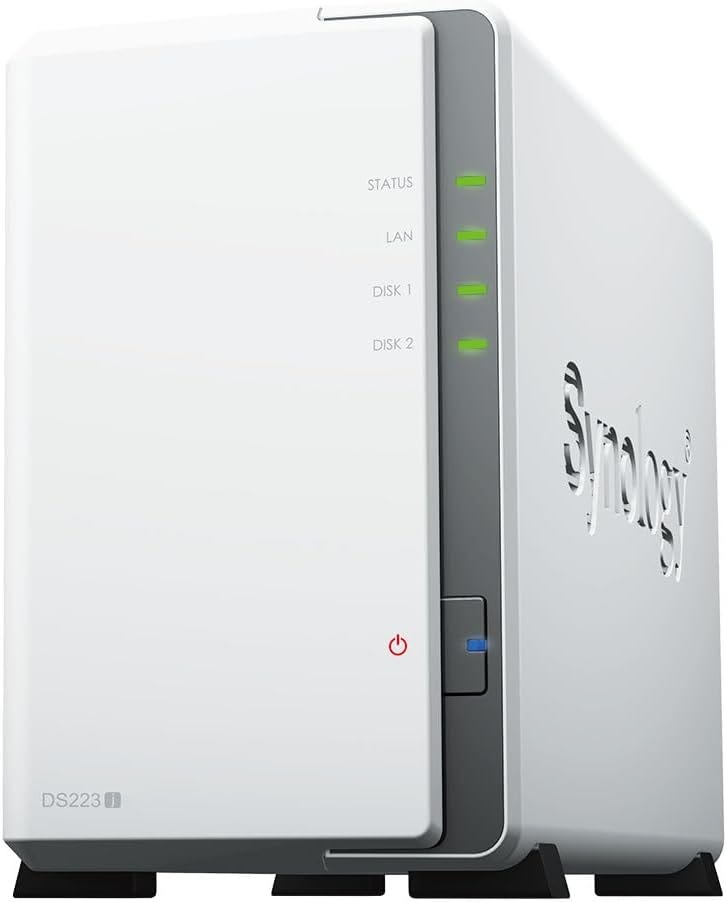
There are more customizable options out there, including building your own box from scratch, but Synology hits a sweet spot between capability and accessibility. Their DiskStation Manager software is genuinely well-designed, and it comes with a suite of applications that replicate most of what you’d use cloud services for:
File syncing across devices
Photo backup and organization
Document collaboration
Media streaming
The initial setup takes an afternoon. You’ll buy the NAS unit, populate it with hard drives, connect it to your router, and walk through the configuration wizard. After that, you’re migrating your files and setting up the apps you need.
It’s not trivial, but it’s not rocket science either. If you get stuck, you can tap into the Synology network or use your favorite chatbot.
What you get in return is meaningful:
your documents, your photos, your videos, your backups, all of it stored on hardware you physically control. No subscription fees. No storage limits beyond the drives you install. No algorithm scanning your photos to train AI models.
Here’s a top selling Synology NAS on Amazon (affiliate link). The model we use is old and discontinued, otherwise we’d link to that one.
4. Fortify Your Email With Disposable Addresses
Your email address is one of the most persistent identifiers in your digital life.
It connects your accounts, follows you across services, and serves as a skeleton key for anyone trying to build a profile on you. Every time you hand it to a new service, you’re giving them a thread they can pull to unravel more of your life.
And you’re trusting them not to sell that thread to data brokers, leak it in a breach, or spam you relentlessly.
The solution isn’t to stop giving out email addresses because that’s not practical. The better move is to stop giving out your real email address.
Email aliasing services let you generate unique, disposable addresses that forward to your real inbox. Sign up for a new service? Give them a unique alias. If that alias starts receiving spam, you know exactly who sold you out, and you can kill the alias without affecting anything else.
Your real address stays protected, compartmentalized away from the chaos of the commercial internet.
The stretch goal here isn’t just to start using aliases occasionally. While that’s still useful, it’s not transformative. The real goal is to make them your default.
Every new account, every newsletter signup, every service that asks for your email: they all get an alias (more or less). Your real address becomes something you share only with people and institutions you genuinely trust.
This takes some adjustment. You’ll need to pick a service and integrate it into your workflow. You’ll need to build the habit of generating a new alias instead of reflexively typing your regular address.
But once the system is in place, it runs almost invisibly.
And the payoff is worth the initial effort:
knowing exactly who has your contact information, being able to revoke access at any time, watching spam simply disappear when you disable a compromised alias.
If you want a more in depth discussion and strategy to setting this up, we’ve put together a comprehensive guide on email aliases (a/k/a disposable email addresses). It walks through the options and the implementation details. Check it out here.

5. Ditch Three Apps for Browser Access
Mobile apps are surveillance tools disguised as convenience.
When you install an app, you’re granting it access to your device in ways that a website could never achieve. Apps can request permissions to your contacts, your location, your camera, your microphone, your files. They can run in the background, tracking your behavior even when you’re not using them. They can fingerprint your device and correlate your activity across services.
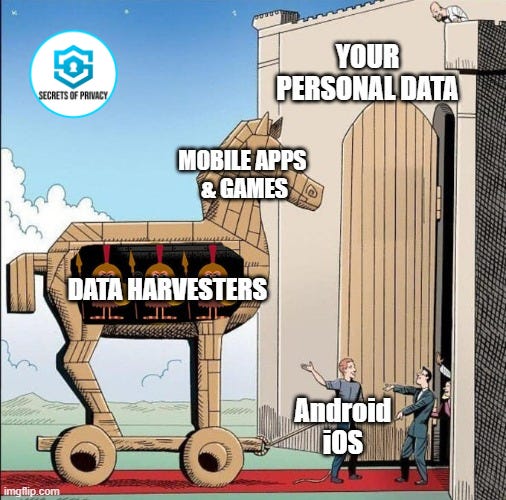
The app model is, by design, a privacy trap.
And here’s something that 99% of smartphone users don’t know or realize:
most apps don’t need to be apps.
They’re just websites wrapped in a native container, with added tracking capabilities bolted on. The service works fine in a browser. The company just prefers you use the app because it gives them more access to your data and more control over your experience.
The goal here is simple. Pick three apps you use regularly and delete them. In their place, use browser bookmarks. And going forward, access those services through your mobile browser instead (preferably something like Brave).
Good candidates to start with:
Shopping apps (Amazon, Target, whatever you use)
Social media apps, if you use those services at all
News apps
Banking apps (if your bank’s mobile site is functional)
Basically, anything where you’re not gaining meaningful functionality from the native app, just surrendering more of your data for a marginally slicker interface.
You’ll lose some convenience. Push notifications disappear. Some features might be buried or absent in the web version. The experience might feel slightly less polished.
But you’ll gain something more valuable: you’ll stop carrying around software that monitors your behavior and reports it back to corporate servers. Your phone becomes a little less cluttered, a little less invasive, a little more yours.
Three apps. That’s all. Pick the ones that give you the least and take the most, and cut them loose.

The Point of Stretch Goals
None of these changes are easy. That’s why they’re stretch goals.
A de-Googled phone means navigating app compatibility issues. Linux means relearning some workflows. A NAS means maintaining hardware. Email aliases mean building new habits. Ditching apps means accepting less convenience.
But each of these represents a genuine shift in your relationship with technology.
You’re not just reducing harm; you’re reclaiming ownership. Your phone OS, your desktop OS, your file storage, your email footprint, your app permissions. These are the load-bearing walls of your digital life. Reinforcing them matters more than any individual setting change or app swap.
Pick one. Maybe two. Give yourself the full year to make it happen.
And when you’re done, you’ll have something that no amount of incremental privacy tips could give you: a part of your digital life that’s genuinely, completely yours.
Friendly Ask
If you found this helpful or informative, chances are your friends and family will as well. Please share it with them to help spread awareness.
Looking for help with a privacy issue or privacy concern? Chances are we’ve covered it already or will soon. Follow us on X and LinkedIn for updates on this topic and other internet privacy related topics.
Disclaimer: None of the above is to be deemed legal advice of any kind. These are *opinions* written by a privacy and tech attorney with years of working for, with and against Big Tech and Big Data. And this post is for informational purposes only and is not intended for use in furtherance of any unlawful activity. This post may also contain affiliate links, which means that at no additional cost to you, we earn a commission if you click through and make a purchase.

Privacy freedom is more affordable than you think. We tackle the top Big Tech digital services and price out privacy friendly competitors here. The results may surprise you.
Do you own a Smart TV? If so, you won’t want to miss this post from our three part series on How To Make Your Smart TV Less Creepy.

If you’re reading this but haven’t yet signed up, join for free (3.9K+ subscribers strong) and get our newsletter delivered to your inbox by subscribing here 👇
“You’re not just reducing harm; you’re reclaiming ownership. Your phone OS, your desktop OS, your file storage, your email footprint, your app permissions. These are the load-bearing walls of your digital life. Reinforcing them matters more than any individual setting change or app swap.”
absolutely. another great post here.
But NAS is more costly than free software. I want privacy but not pay a lot of money, i started using email alias, and try to ditch apps.